Challenge Pro
This page explains Bypassing Toolkit (Challenge Pro) from two roles: what the Admin configures globally, and what a regular user can configure and use day-to-day.
Role split
- Admin area: Bypassing Toolkit Settings
- User area: Bypassing Toolkit Integrations
- Operational actions (re-login / challenge flows / bulk tools) are triggered from accounts workflow and backend actions
Admin and integration-level controls for 2Captcha, OpenAI and related toolkit settings.
Challenge Pro UI refresh
The current UI adds bigger action popups for adding and importing accounts, plus a privacy-oriented Blur Mode inside the main app sidebar. These updates make the module easier to use during repetitive account operations and while sharing your screen with others.
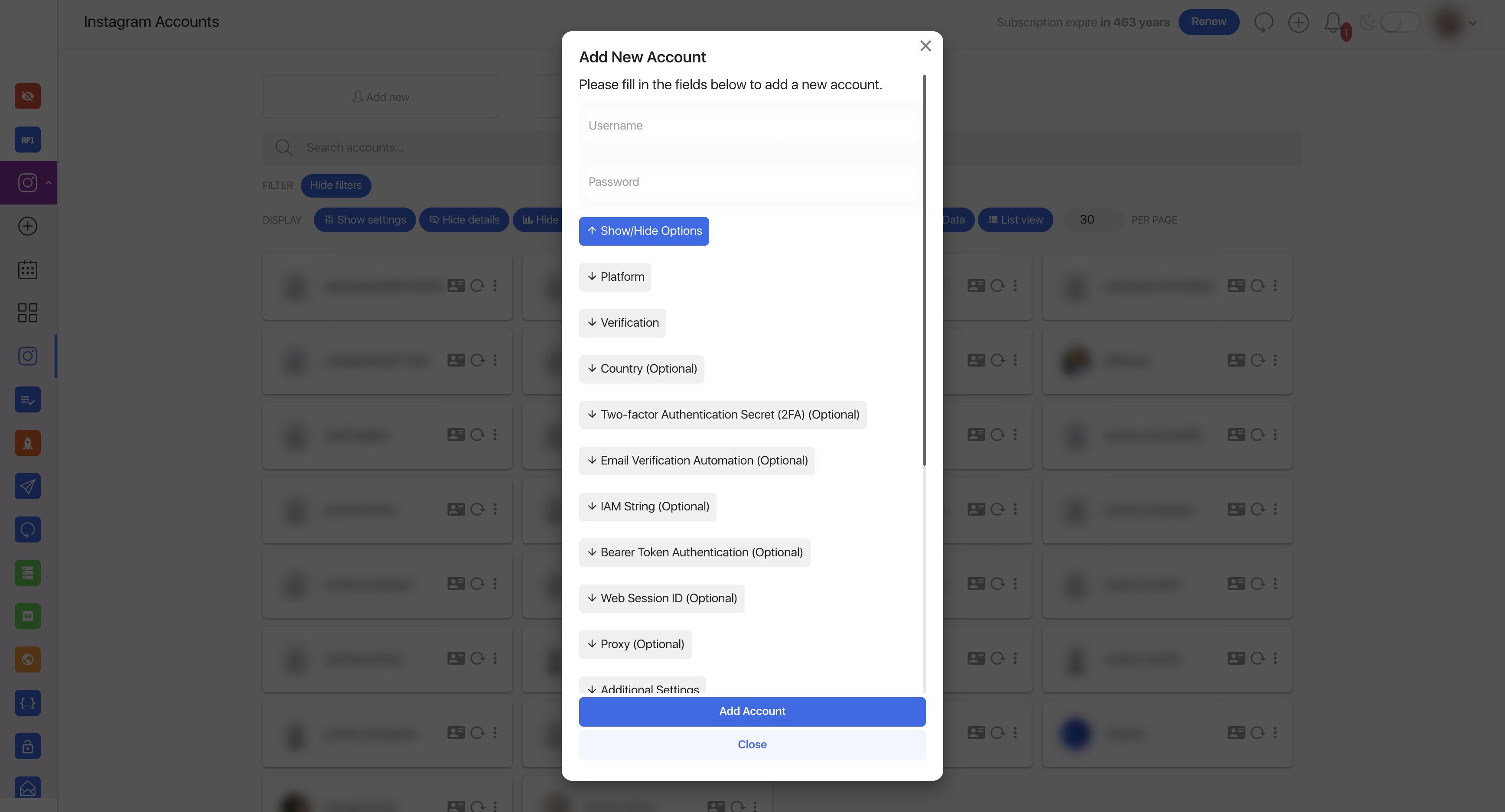
Add New Account is now a multi-section modal with platform, device, verification, and advanced login controls, while Import Accounts uses a cleaner bulk-paste workflow with optional AI formatting.
Expanded add-account modal with platform selectors and advanced login fields.
Bulk import modal with advanced options and AI-assisted formatting.
Privacy toggle exposed in the main sidebar to blur sensitive account data on screen.
Email login and reconnect workflow
Challenge Pro can reconnect accounts through Instagram's email-login flow, including accounts for which Nextpost does not have a reusable password. The reconnect starts with a clean session, follows Instagram's current routing, and asks for the delivery choice or one-time code only when Instagram requires it.
- Email delivery can use a manually entered code or IMAP automation when mailbox credentials are available.
- SMS can be selected when Instagram offers it as an alternative delivery method.
- The password is optional for a passwordless email reconnect. Saving the real current password is still recommended because it gives the system another recovery path after a future logout.
- If Instagram returns a passwordless-login requirement during a normal operation, the account is marked for reconnect with a specific instruction instead of a generic incorrect-password message.
Bulk account maintenance
- Bulk IMAP detection can infer common mail-server settings and apply reusable mailbox parameters during account import.
- Bulk delete removes selected imported accounts only after an explicit confirmation and reports progress in the same bulk-workflow style as import actions.
- Partial log download returns a useful slice of a large reconnect/debug log, which is faster and safer to share during troubleshooting than exporting the entire file.
- IAM parsing now has stronger Instagram ID and header fallbacks for account records imported from different tools or formats.
User: integrations page
Most account-level work happens in Integrations page. This is where personal API keys and UI preferences are configured, depending on package policy.
User sections in integrations
- 2Captcha API key + status + balance
- 5sim API key + balance + max price + country priority
- HikerAPI key + status (safe stats fetching integration)
- OpenAI key + model + optional technical-proxy mode
- UI preferences: show account email/phone/challenge type
- Advanced preferences: automated submit-phone allocation and stats fallback toggles
What users can actually do in workflow
From accounts/reconnect flows, users can run challenge recovery operations that the controller exposes.
- Reconnect and refresh account self info
- Handle challenge steps: submit email/phone/code/choice, two-factor steps, captcha bypass
- Appeal/selfie/challenge recovery related actions
- Account details helpers and challenge type checks
- Bulk account operations (import/status/cancel/dismiss/upload selfie) when available
Popup workflow used during account challenge/reconnect operations.
User limitations
- Users cannot access global admin settings page.
- Available integrations/features depend on package policy flags configured by admin.
- If email verification is enforced, non-admin users must be verified before using these endpoints.
Admin vs User quick matrix
| Area | Admin | Regular user |
|---|---|---|
| Global license + module branding | Yes | No |
| Package policy flags | Yes | No |
| Personal integration keys | Can configure | Can configure |
| Re-login/challenge operations | Yes | Yes, if allowed by account/package state |
| GitHub module update actions | Yes | No |