Want a guided onboarding flow with progress tracking? Start the Quick Start tour.
Quick Start
Follow these simple steps to start using NextPost Pro.
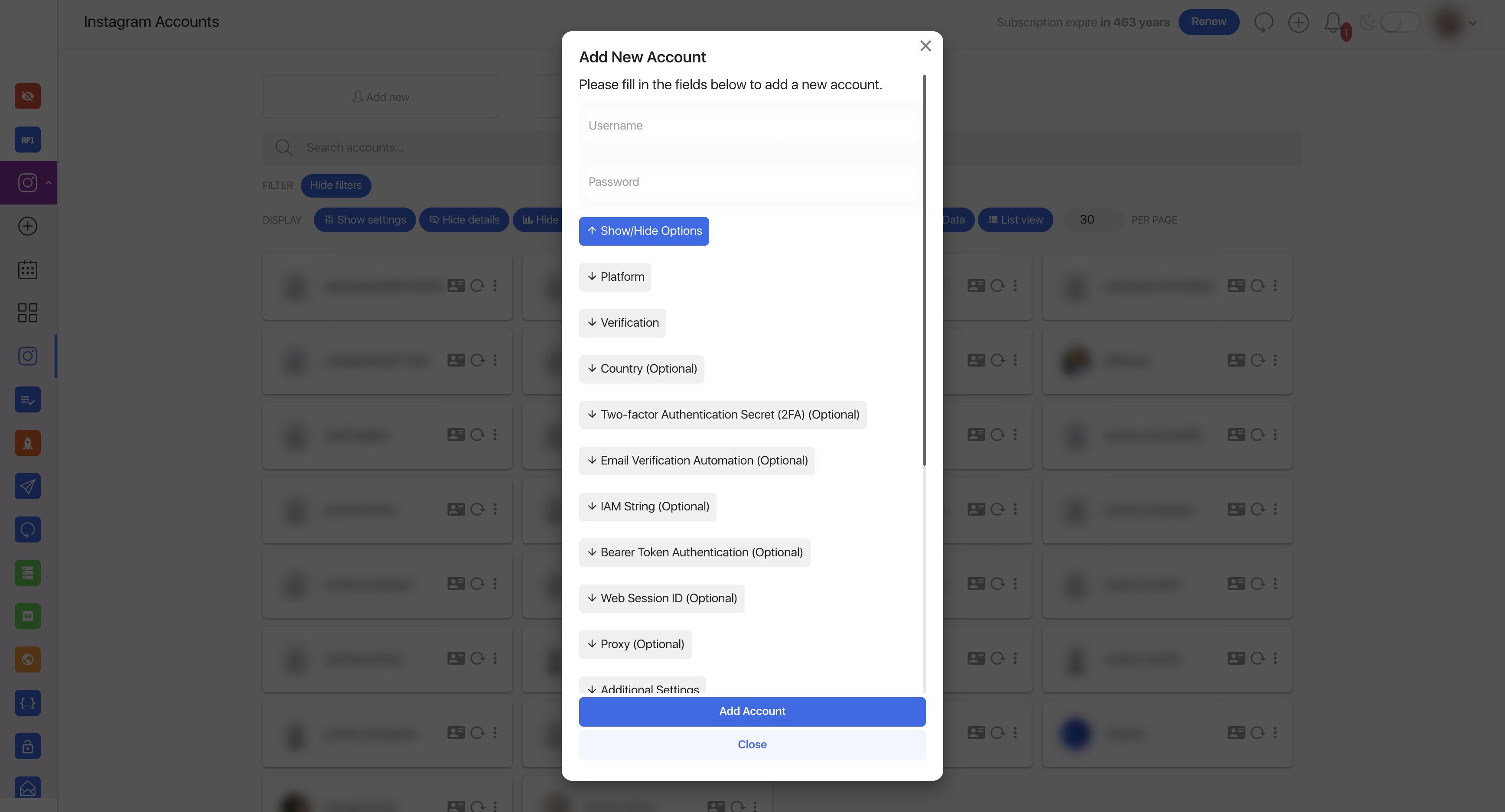
Connect your first Instagram account
- Open Instagram Accounts.
- Click Add Account (or Add new if this button is visible in your plan).
- Enter Instagram username and password.
- Click Add account and complete verification if Instagram asks for a security code.
Some users will also see extra optional fields (2FA secret, proxy, session methods). This depends on enabled modules in their package.
Connect Instagram account with login fields and optional advanced options.
After successful login, account cards appear with status and quick actions.
Create your first post
- Click Schedule Post in the sidebar.
- Select the account(s) you want to post to.
- Upload your image or video.
- Write your caption — you can use a saved Caption Template.
- Choose Post now or pick a date/time to schedule.
- Click Save.
Compose content, pick target account and save as immediate or scheduled post.
Story-specific layout and sticker workflow.
View your schedule
Open Calendar to see planned posts and check publication dates.
Central view for planned and published content across dates.
Boost activity with advanced modules
When these modules are enabled in your plan, use them together to improve sourcing, engagement, delivery quality, and account stability.
- Challenge Pro — challenge and reconnect workflows